Blue Marble Geographics highlights how Global Mapper, its geospatial data analysis and GIS mapping software, has become an essential tool for teams at Egis, supporting advanced terrain modeling and hydrological analysis.
Egis have relied on Global Mapper as a core tool for digital terrain modeling, hydrological analysis, and environmental studies. Initially tested as a geospatial software solution, it has since evolved into a company-wide tool, used daily across multiple projects.

Terrain analysis.
Prior to adopting Global Mapper, Egis relied on MapInfo and began receiving DWG and DXF plans, which proved difficult to work with. Global Mapper version 12 was then tested as a solution for creating Digital Elevation Models (DEMs), providing an effective alternative.
The software’s ability to open a wide range of file types, including 3D formats such as DWG and DXF, as well as georeferenced PDFs, alongside its capability to apply and modify projection systems, were advanced features at the time, making it immediately valuable for Egis teams.
Global Mapper has since been fully integrated into the company’s workflow. Egis teams have worked with versions 14, 16, 20, 24, and now 26, supported by both floating and single-user licenses, including Pro versions for advanced applications.
Its performance with large datasets and point clouds has proven particularly valuable. While other GIS solutions, such as QGIS, can struggle with the size and complexity of Egis’s data, Global Mapper handles these challenges efficiently and also integrates well with other software used by Egis.
How Egis Uses Global Mapper
Egis’s teams use Global Mapper in two main stages: pre-processing, where data and models are prepared, and post-processing, where the results of analyses are compared and refined.
Pre-Processing
In the first stage, the goal is to produce accurate DEMs and 3D objects. Teams import and georeference point clouds from HD LiDAR data, existing DEMs, and other topographic sources such as DWG, DXF, and SHP files.

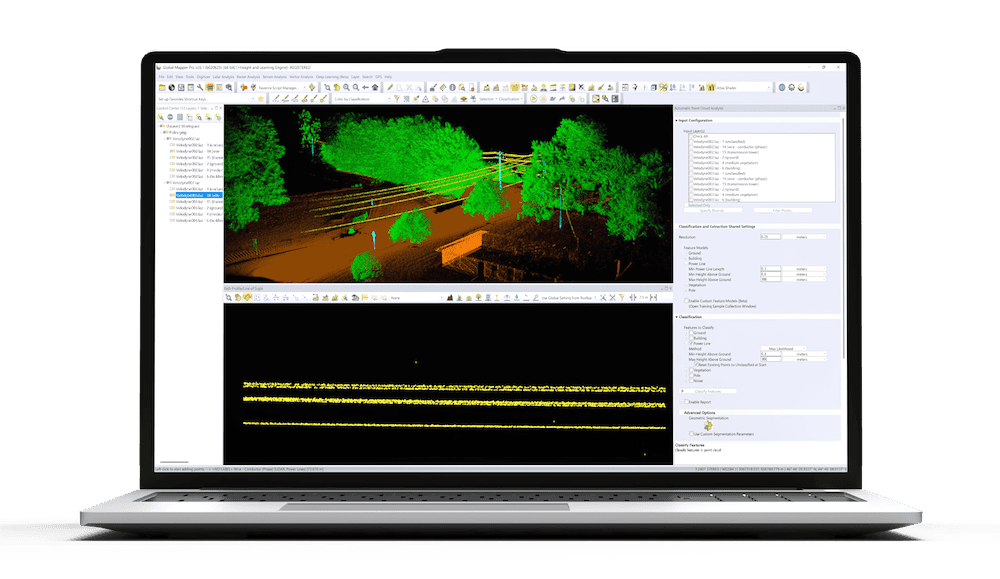
LiDAR and path profile.
Using 3D constraint lines, Egis teams interpolate these datasets to recreate realistic topographies and bathymetries of minor riverbeds. This approach enables them to combine terrestrial topography with LiDAR data, producing accurate terrain reconstructions in regions where LiDAR alone cannot capture all details, particularly in areas with vegetation. Teams then derive 3D representations of riverbanks and terrain features.
Egis uses similar approaches to digitize riverbanks, riverbeds, and the central “skeleton” lines of watercourses. The teams also conduct watershed analyses to define drainage areas, hydraulic paths, and ridgelines. These outputs are then used to build hydraulic models in specialized software such as HEC-RAS.
Post-Processing
After modeling, results are often generated as shapefiles or grids representing velocities, heights, and elevations. Using Global Mapper’s Compare/Combine Terrain Layers tool, Egis compares projected and current conditions to assess project impacts.
The software also allows the export of data as DXF point clouds for visualization and mapping. Through tools like Reduce/Divide by Specified Spacing, teams create longitudinal profiles that can be mapped across different grids, comparing riverbeds, projected banks, and waterlines for example.
Integration with Excel is another key feature, as it allows users to retrieve X/Y and distance/Z coordinates in both directions between programs, an essential step for compatibility with hydraulic modeling tools such as HEC-RAS.
Global Mapper is used to render 3D visualizations, provided a DEM underlies the data. Teams calculate slope statistics for the studied area and perform volume calculations, particularly to identify embankment volumes in flood zones and to analyze height-volume relationships for dams and retention basins.
When working with multiple DEMs, the Trace Profile tool is used to visualize the different elevations along a cross-section. Egis has developed custom shaders and visual templates to standardize the appearance of outputs across projects.
Key Tools & Applications
Egis’ recent work has primarily involved processing the latest generation of LiDAR points. The Trace Profile window and point classification visualization tools in Global Mapper are used extensively to identify potential errors in pre-classified LiDAR data, which can then be corrected or manually classified.

Watershed analysis.
This data allows terrain features such as walls, banks, and ditches to be represented in 3D, even in areas where vegetation limits the number of ground points captured automatically.
Global Mapper is also used to conduct field-of-vision and intervisibility analyses, for example to assess the visual impacts of pylons. The software’s simulation capabilities are applied to model rising sea levels and to evaluate marine influence in downstream areas.
Among the many tools used at Egis, three Global Mapper tools are particularly central to daily workflows:
- Combine/Compare Terrain Layers is essential for evaluating project impacts.
- Create Skeleton(s) is used frequently for generating watercourse centerlines.
- KMZ Export is vital for sharing results outside of Global Mapper.
Visit the Geomatique website to find out more information.